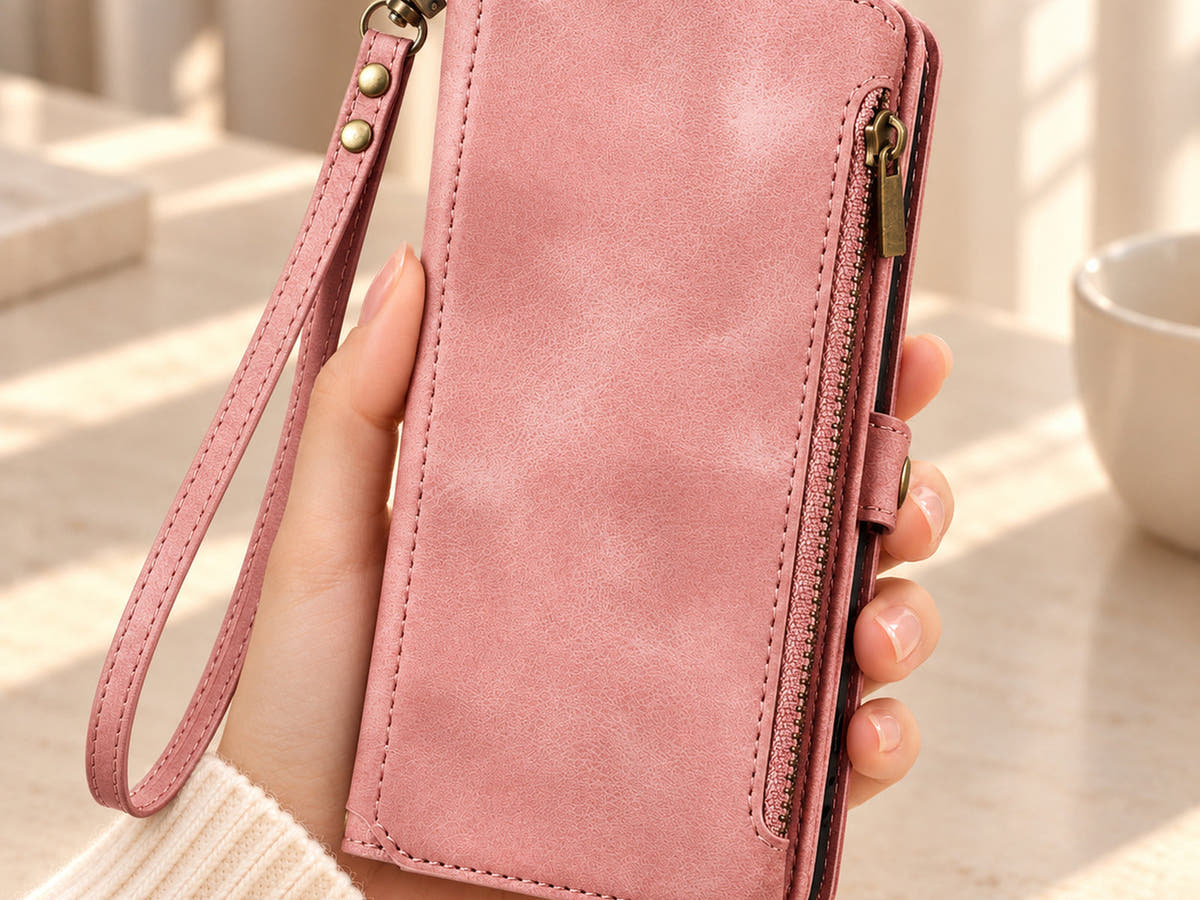
A phone case with a wrist strap should fit the way you reach for, open and put away your phone. The useful details are often small: where the loop clips on, whether it detaches, how the wallet opens beside it and whether the loaded case feels comfortable in your hand.
Use this guide to compare those details in Oskar Hill’s wallet phone cases. Start with your everyday routine, then look closely at the attachment and product photographs before choosing a colour.
1. Decide when you will use the wrist loop
Think about one specific moment: leaving the house with your phone and a few cards, taking a quick photograph, or moving between a bag and your desk. A short wrist loop gives you a different carrying option from a long shoulder or crossbody strap. Check which type the listing actually includes.
If you usually keep your phone in a small bag, a removable loop may be useful because you can detach it when you want less hardware around the case. If you often hold a folio open to read or reply, pay more attention to where the clip sits and how the cover folds back. A good choice works for both carrying and using the phone.
2. Look at the complete attachment, not just the strap
Find a close-up that shows the loop, its clip and the point where it joins the case. A long strap shown beside a product does not establish how it connects. The description should also say whether it is included and removable.
Compare these visible details:
- Clip access: can you see the opening mechanism clearly enough to understand how it attaches?
- Position: is the attachment near the cover, a corner or a separate tab, and where will it sit while you use the phone?
- Finish: look at the stitching, strap edges and hardware in more than one photograph.
- Included parts: confirm the matching loop comes with the case rather than being a styling accessory.
For example, BlushCarry lists a matching detachable wrist strap with a bronze-tone clip. Its gallery shows that attachment beside the plain textured cover and separate edge zip pocket. Those photographs help you assess the arrangement without assuming a particular loop size or load rating.

3. Check comfort with the whole case in mind
A photograph can show shape and finish, but it cannot tell you exactly how a loop will feel on your wrist. Look for the strap’s measurements, whether its opening adjusts and what the product says about the material. Do not infer adjustability from a buckle, stud or stitched detail in a photograph.
Consider the phone and the items you intend to carry together. A wallet with cards and coins will feel different from an empty case. Choose storage around what you need each day, and avoid packing pockets so tightly that the cover or zip becomes awkward to close.
If loop dimensions or adjustability are not stated, ask through our contact page before ordering. Mention the design and the measurement you need. This is more useful than choosing from a general label such as “comfortable” or “universal”.
4. Compare how the cover and wallet open
Imagine using the case while the loop is attached. Can you open the cover, reach a card and close it again without the strap crossing the area you need? Check the open-case photographs as well as the closed front. A detachable strap can be removed for some uses, but the layout of the wallet still matters.
BlushCarry combines its loop with a fold-out card section, photo window and separate edge zip pocket. It is an example to examine when you want several storage areas. Look at how that fold-out section opens before deciding whether the arrangement suits the way you pay or reach for a card.
The Butterfly Embossed Wallet Case takes a different approach: a patterned folio cover, interior card slots and a matching short loop with zigzag stitching and a silver-tone clip. The choice between the two begins with the cover and storage layout; both also offer a wrist-loop carrying option.

5. Match the design to two everyday situations
A short outing with a few essentials
List the items you need first, then compare the case with those items in mind. If you want a separate zip compartment, look at its position and how it opens. BlushCarry has an edge zip pocket; Valencia Luxe has a curved front zip pocket, three internal card slots and a clear ID window. Both list a matching detachable wrist strap. This gives you a practical comparison beyond colour alone.
A desk day with frequent phone use
If the case moves repeatedly between your hand, a bag and a tabletop, consider whether you prefer to remove the loop for part of the day. Check how the folio folds for reading or viewing, and where the detached strap will stay. Choosing a loop because it looks attractive is reasonable; making sure it suits your normal routine helps you decide whether you will actually use it.
6. Make these final checks before ordering
- Exact phone model: confirm the selected version matches your device. Our iPhone model-checking checklist explains this step.
- Strap details: check whether the loop is included, detachable and adjustable, and ask about missing measurements.
- Daily access: view the clip, cover, zip and card section together.
- Carry expectations: treat the loop as a carrying feature. Its presence alone does not establish a tested drop-protection or anti-theft claim.
- Fit after arrival: while keeping the phone supported, check that the case seats properly, the clip closes fully and the loop feels suitable before normal use.
Questions about phone cases with wrist straps
Is a wrist strap the same as a crossbody strap?
No. A short wrist loop and a longer crossbody strap serve different carrying arrangements. Check the actual included strap rather than assuming one can be used in both ways.
Can I replace the loop with another strap?
Only choose a replacement when its attachment is explicitly compatible with the case. Similar-looking clips do not establish a suitable fit. Ask about the intended connection before adding a different strap.
Does a wrist strap make a case MagSafe compatible?
No. A wrist strap and charging compatibility are separate features. Rely on the exact case and charger specifications for charging, and do not infer compatibility from the strap or hardware.
Which detail should I compare first?
After confirming your phone model, start with how the strap attaches and how the case opens with it in place. Then compare loop measurements, storage and finish. Browse Oskar Hill wallet phone cases when you are ready to put those checks into practice.